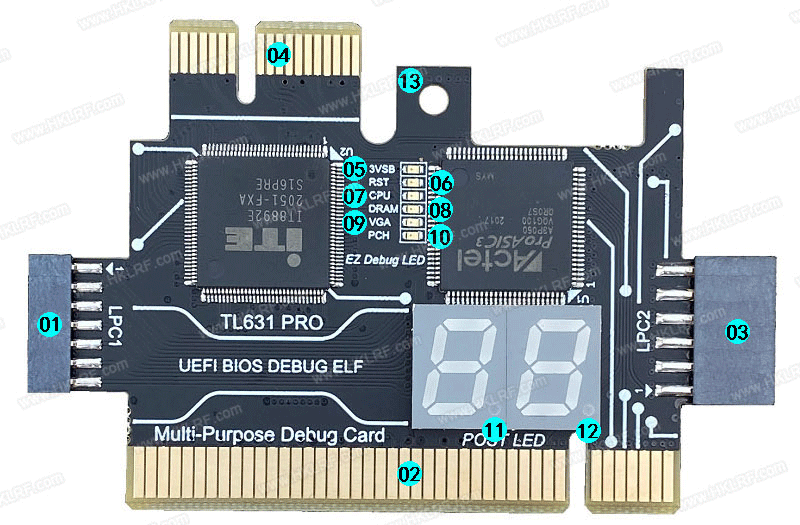
Hình 1: Chi tiết 13 cổng giao diện kết nối (LPC1, LPC2, PCI, PCIe, M.2) và đèn LED mã POST Card Test TL631 PRO
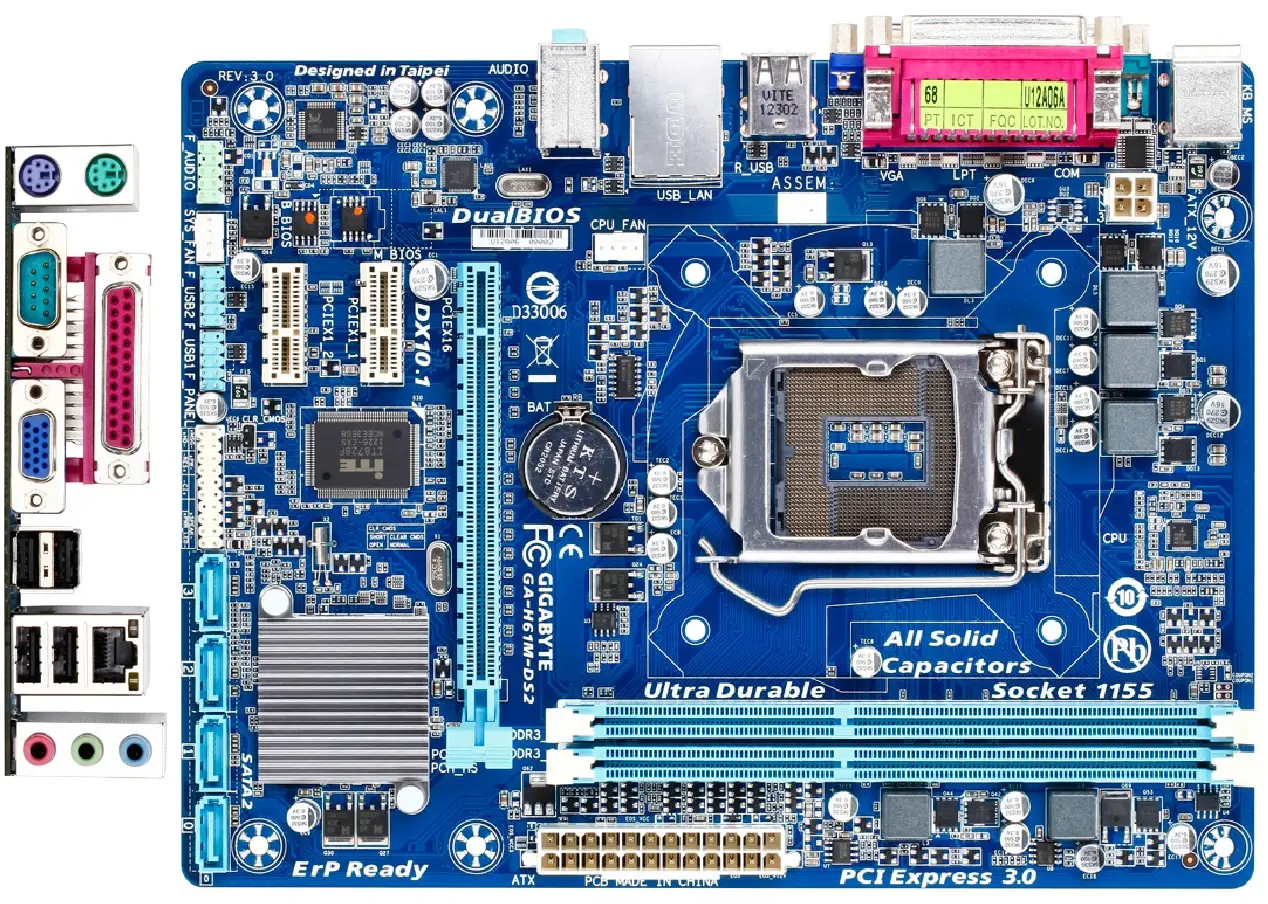
Hình 1: Bo mạch chủ Gigabyte GA-H81M-DS2 Rev 3.0 với các cổng kết nối debug card test
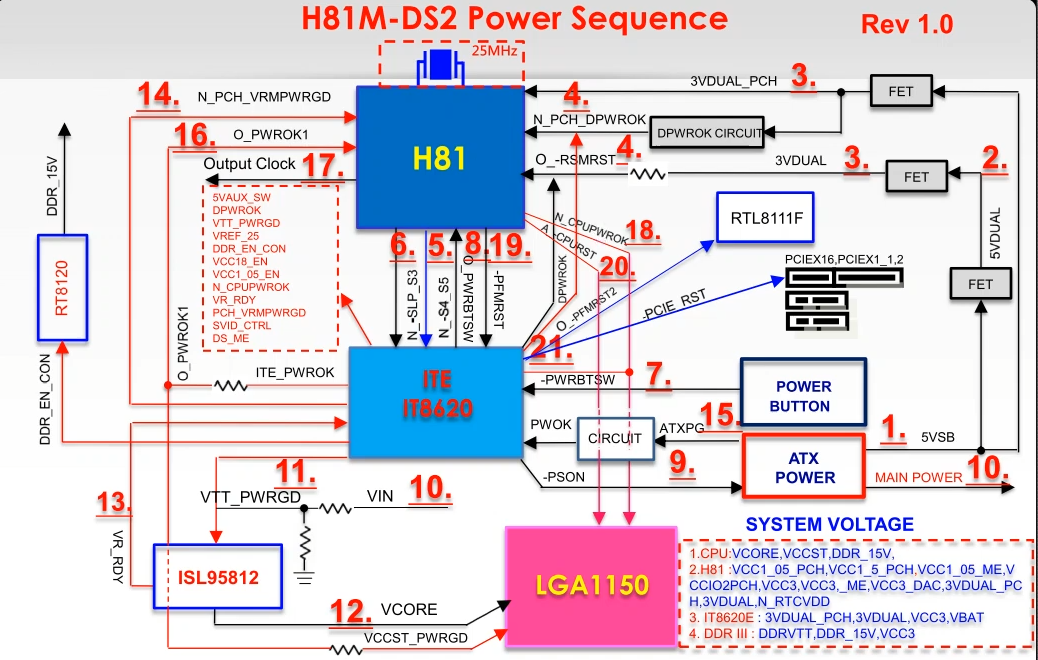
Hình 2: Sơ đồ chu trình khởi động và các pha đọc mã POST của BIOS trên bo mạch
## Giới Thiệu Card Test Lỗi TL631 PRO Chuyên Nghiệp
Card test lỗi **TL631 PRO** là thiết bị chẩn đoán phần cứng bo mạch chủ (Mainboard PC) và Laptop thế hệ mới, hỗ trợ đa giao diện kết nối: LPC1, LPC2, LPC3, khe cắm PCI, PCI-E x1, M.2 WiFi (A/E key) và cổng gỡ lỗi chuyên biệt DEBUG-CON trên Asus, MSI, Gigabyte, Dell, Lenovo.
```
+-------------------------------------------------------------+
| TL631 PRO DIAGNOSTIC INTERFACE |
| [LPC1 (2.0)] [LPC2 (2.54)] [PCI BUS] [PCIe x1] [M.2 NGFF] |
| |
| +---------------+ +---------------+ |
| | 7-SEG (H) | | 7-SEG (L) | STATUS LEDS: |
| | [ C ] | | [ 0 ] | - RST (Reset) |
| +---------------+ +---------------+ - CLK (Clock) |
| - 3V3 (Standby) |
| BÁO MÃ POST: C0 = LỖI CPU / SOCKET - RUN (Bios Run) |
+-------------------------------------------------------------+
```
---
## Chi Tiết Hướng Dẫn Kỹ Thuật Trích Xuất Từ Tài Liệu Gốc PCTCO
Card test lỗi TL631 PRO
01. LPC1 = kết nối giao diện LPC chân nhỏ 2.0 của mainboard. Mô-đun 2.0 (giao diện LPC3 mở rộng của mô-đun có thể được kết nối với card chuyển đổi MINI PCIE của laptop . card chuyển đổi A-DEBUG. laptop ASUS DEBUG-CON, EC-DEBUG).
02. PCI = hỗ trợ tất cả các khe cắm PCI.
03. LPC2 = kết nối với giao diện LPC chân lớn 2.54 của mainboard. ASUS COM-DEBUG. ASRock UART1, MSI JDP, Supermicro SPI.
04. PCIE X1 = hỗ trợ Gigabyte không có mainboard PCI (các thương hiệu khác không hỗ trợ)
05. Đèn báo nguồn 3VSB.
06. Đèn báo RST, để kiểm tra Reset có bình thường không (chỉ khi dùng cổng PCI. PCIE).
07. Đèn báo CPU, để phát hiện xem mô-đun CPU có bình thường không.
08. Đèn báo DRAM, kiểm tra xem mô-đun bộ nhớ.
09. Đèn báo VGA, kiểm tra card đồ họa.
10. Đèn báo cầu nam PCH, kiểm tra cầu nam có hoạt động bình thường hay không.
11. Dấu thập phân DP, hiển thị tín hiệu CLK.
12. Dấu thập phân DP, hiển thị tín hiệu khung FRAME.
LPC1 , kết nối với mainboard chân cắm LPC nhỏ, mô-đun 2.0 (mô-đun mở rộng giao diện LPC3 có thể kết nối với card chuyển đổi MINI PCIE của laptop, card chuyển đổi A-DEBUG, DEBUG-CON của laptop, EC-DEBUG)
Kênh PCI tốc độ cao, hỗ trợ tất cả các khe cắm PCI.
LPC2 , kết nối với giao diện LPC chân lớn 2.54 của mainboard, COM-DEBUG, ASRock UART1, MSI JDP, Supermicro SPl.
PCIE X1 , hỗ trợ mainboard Gigabyte không có PCI (các thương hiệu khác không hỗ trợ).
Đèn báo nguồn 3VSB để phát hiện nguồn điện có bình thường hay không.
Chỉ báo thiết lập lại RST để kiểm tra Reset của mainboard (chỉ khi PCI hoặc PCIE được lắp vào)
Đèn báo CPU để phát hiện xem mô-đun CPU có bình thường không.
Đèn báo bộ nhớ DRAM để phát hiện xem mô-đun bộ nhớ có bình thường không.
Đèn báo đồ họa VGA để phát hiện xem mô-đun card đồ họa có bình thường không.
Đèn báo PCH để phát hiện xem mô-đun cầu nam có hoạt động bình thường hay không.
Hiển thị tín hiệu CLK , hiển thị tín hiệu khung FRAME.
UEFI BIOS DEBUG
ASRock ERROR CODE:
0
Please check if the CPU is installed correctly and then clear CMOS
0D
Problem related to memory, VGA card or other devices. Please clear CMOS, re-install the memory and VGA card, and remove other USB, PCI devices
01-54
(except 0d), 5A-60Problem related to memory. Please re-install the CPU and memory then clear CMOS. If the problem still exists, please install only one memory module or try using other memory modules.
55
The Memory could not be detected. Please re-install the memory and CPU. If the problem still exists, please install only one memory module or try using other memory modules.
61 - 91
Chipset initialization error. Please press reset or clear CMOS.
92-99
Problem related to PCI-E devices. Please re-install PCI-E devices or try installing them in other slots. If the problem still exists, please remove all PCI-E devices or try using another VGA card.
A0-A7
Problem related to IDE or SATA devices. Please re-install IDE and SATA devices. If the problem still exists, please clear CMOS and try removing all SATA devices.
b0
Problem related to memory. Please re-install the CPU and memory. If the problem still exists, please install only one memory module or try using other memory modules.
b4
Problem related to USB devices. Please try removing all USB devices.
b7
Problem related to memory. Please re-install the CPU and memory then clear CMOS. If the problem still exists, please install only one memory module or try using other memory modules.
d6
The VGA could not be recognized. Please clear CMOS and try re-installing the VGA card. If the problem still exists, please try installing the VGA card in other slots or use other VGA cards.
d7
The Keyboard and mouse could not be recognized. Please try re-installing the keyboard and mouse
d8
Invalid Password.
FF
Please check if the CPU is installed correctly and then clear CMOS.
BIOS AMI
00 - Not used
01 - Power on. Reset type detection (soft/hard)
02 - AP initialization before microcode loading
03 - System Agent initialization before microcode loading
04 - PCH initialization before microcode loading
05 - OEM initialization before microcode loading
06 - Microcode loading
07 - AP initialization after microcode loading
08 - System Agent initialization after microcode loading
09 - PCH initialization after microcode loading
0A - OEM initialization after microcode loading
0B - Cache initialization
SEC Error Codes
0C - Reserved for future AMI SEC error codes
0D - Reserved for future AMI SEC error codes
0E - Microcode not found
0F - Microcode not loaded
PEI Phase
10 - PEI Core is started
11 - Pre-memory CPU initialization is started
12 - Pre-memory CPU initialization (CPU module specific)
13 - Pre-memory CPU initialization (CPU module specific)
14 - Pre-memory CPU initialization (CPU module specific)
15 - Pre-memory System Agent initialization is started
16 - Pre-Memory System Agent initialization (System Agent module specific)
17 - Pre-Memory System Agent initialization (System Agent module specific)
18 - Pre-Memory System Agent initialization (System Agent module specific)
19 - Pre-memory PCH initialization is started
1A - Pre-memory PCH initialization (PCH module specific)
1B - Pre-memory PCH initialization (PCH module specific)
1C - Pre-memory PCH initialization (PCH module specific)
1D - OEM pre-memory initialization codes
1E - OEM pre-memory initialization codes
1F - OEM pre-memory initialization codes
20 - OEM pre-memory initialization codes
21 - OEM pre-memory initialization codes
22 - OEM pre-memory initialization codes
23 - OEM pre-memory initialization codes
24 - OEM pre-memory initialization codes
25 - OEM pre-memory initialization codes
26 - OEM pre-memory initialization codes
27 - OEM pre-memory initialization codes
28 - OEM pre-memory initialization codes
29 - OEM pre-memory initialization codes
2A - OEM pre-memory initialization codes
2B - Memory initialization. Serial Presence Detect (SPD) data reading
2C - Memory initialization. Memory presence detection
2D - Memory initialization. Programming memory timing information
2E - Memory initialization. Confi guring memory
2F - Memory initialization (other)
30 - Reserved for ASL (see ASL Status Codes section below)
31 - Memory Installed
32 - CPU post-memory initialization is started
33 - CPU post-memory initialization. Cache initialization
34 - CPU post-memory initialization. Application Processor(s) (AP) initialization
35 - CPU post-memory initialization. Boot Strap Processor (BSP) selection
36 - CPU post-memory initialization. System Management Mode (SMM) initialization
37 - Post-Memory System Agent initialization is started
38 - Post-Memory System Agent initialization (System Agent module specific)
39 - Post-Memory System Agent initialization (System Agent module specific)
3A - Post-Memory System Agent initialization (System Agent module specific)
3B - Post-Memory PCH initialization is started
3C - Post-Memory PCH initialization (PCH module specific)
3D - Post-Memory PCH initialization (PCH module specific)
3E - Post-Memory PCH initialization (PCH module specific)
3F - OEM post memory initialization codes
40 - OEM post memory initialization codes
41 - OEM post memory initialization codes
42 - OEM post memory initialization codes
43 - OEM post memory initialization codes
44 - OEM post memory initialization codes
45 - OEM post memory initialization codes
46 - OEM post memory initialization codes
47 - OEM post memory initialization codes
48 - OEM post memory initialization codes
49 - OEM post memory initialization codes
4A - OEM post memory initialization codes
4B - OEM post memory initialization codes
4C - OEM post memory initialization codes
4D - OEM post memory initialization codes
4E - OEM post memory initialization codes
4F - DXE IPL is started
PEI Error Codes
50 - Memory initialization error. Invalid memory type or incompatible memory speed
51 - Memory initialization error. SPD reading has failed
52 - Memory initialization error. Invalid memory size or memory modules do not match
53 - Memory initialization error. No usable memory detected
54 - Unspecifi ed memory initialization error
55 - Memory not installed
56 - Invalid CPU type or Speed
57 - CPU mismatch
58 - CPU self test failed or possible CPU cache error
59 - CPU micro-code is not found or micro-code update is failed
5A - Internal CPU error
5B - reset PPI is not available
5C - Reserved for future AMI error codes
5D - Reserved for future AMI error codes
5E - Reserved for future AMI error codes
5F - Reserved for future AMI error codes
DXE Phase
60 - DXE Core is started
61 - NVRAM initialization
62 - Installation of the PCH Runtime Services
63 - CPU DXE initialization is started
64 - CPU DXE initialization (CPU module specific)
65 - CPU DXE initialization (CPU module specific)
66 - CPU DXE initialization (CPU module specific)
67 - CPU DXE initialization (CPU module specific)
68 - PCI host bridge initialization
69 - System Agent DXE initialization is started
6A - System Agent DXE SMM initialization is started
6B - System Agent DXE initialization (System Agent module specific)
6C - System Agent DXE initialization (System Agent module specific)
6D - System Agent DXE initialization (System Agent module specific)
6E - System Agent DXE initialization (System Agent module specific)
6F - System Agent DXE initialization (System Agent module specific)
70 - PCH DXE initialization is started
71 - PCH DXE SMM initialization is started
72 - PCH devices initialization
73 - PCH DXE Initialization (PCH module specific)
74 - PCH DXE Initialization (PCH module specific)
75 - PCH DXE Initialization (PCH module specific)
76 - PCH DXE Initialization (PCH module specific)
77 - PCH DXE Initialization (PCH module specific)
78 - ACPI module initialization
79 - CSM initialization
7A - Reserved for future AMI DXE codes
7B - Reserved for future AMI DXE codes
7C - Reserved for future AMI DXE codes
7D - Reserved for future AMI DXE codes
7E - Reserved for future AMI DXE codes
7F - Reserved for future AMI DXE codes
80 - OEM DXE initialization codes
81 - OEM DXE initialization codes
82 - OEM DXE initialization codes
83 - OEM DXE initialization codes
84 - OEM DXE initialization codes
85 - OEM DXE initialization codes
86 - OEM DXE initialization codes
87 - OEM DXE initialization codes
88 - OEM DXE initialization codes
89 - OEM DXE initialization codes
8A - OEM DXE initialization codes
8B - OEM DXE initialization codes
8C - OEM DXE initialization codes
8D - OEM DXE initialization codes
8E - OEM DXE initialization codes
8F - OEM DXE initialization codes
90 - Boot Device Selection (BDS) phase is started
91 - Driver connecting is started
92 - PCI Bus initialization is started
93 - PCI Bus Hot Plug Controller Initialization
94 - PCI Bus Enumeration 32
95 - PCI Bus Request Resources
96 - PCI Bus Assign Resources
97 - Console Output devices connect
98 - Console input devices connect
99 - Super IO Initialization
9A - USB initialization is started
9B - USB Reset
9C - USB Detect
9D - USB Enable
9E - Reserved for future AMI codes
9F - Reserved for future AMI codes
A0 - IDE initialization is started
A1 - IDE Reset
A2 - IDE Detect
A3 - IDE Enable
A4 - SCSI initialization is started
A5 - SCSI Reset
A6 - SCSI Detect
A7 - SCSI Enable
A8 - Setup Verifying Password
A9 - Start of Setup
AA - Reserved for ASL (see ASL Status Codes section below)
AB - Setup Input Wait
AC - Reserved for ASL (see ASL Status Codes section below)
AD - Ready To Boot event
AE - Legacy Boot event
AF - Exit Boot Services event
B0 - Runtime Set Virtual Address MAP Begin
B1 - Runtime Set Virtual Address MAP End
B2 - Legacy Option ROM Initialization
B3 - System Reset
B4 - USB hot plug
B5 - PCI bus hot plug
B6 - Clean-up of NVRAM
B7 - Confi guration Reset (reset of NVRAM settings)
B8 - Reserved for future AMI codes
B9 - Reserved for future AMI codes
BA - Reserved for future AMI codes
BB - Reserved for future AMI codes
BC - Reserved for future AMI codes
BD - Reserved for future AMI codes
BE - Reserved for future AMI codes
BF - Reserved for future AMI codes
C0 - OEM BDS initialization codes
C1 - OEM BDS initialization codes
C2 - OEM BDS initialization codes
C3 - OEM BDS initialization codes
C4 - OEM BDS initialization codes
C5 - OEM BDS initialization codes
C6 - OEM BDS initialization codes
C7 - OEM BDS initialization codes
C8 - OEM BDS initialization codes
C9 - OEM BDS initialization codes
CA - OEM BDS initialization codes
CB - OEM BDS initialization codes
CC - OEM BDS initialization codes
CD - OEM BDS initialization codes
CE - OEM BDS initialization codes
CF - OEM BDS initialization codes
DXE Error Codes
D0 - CPU initialization error
D1 - System Agent initialization error
D2 - PCH initialization error
D3 - Some of the Architectural Protocols are not available
D4 - PCI resource allocation error. Out of Resources
D5 - No Space for Legacy Option ROM
D6 - No Console Output Devices are found
D7 - No Console Input Devices are found
D8 - Invalid password
D9 - Error loading Boot Option (LoadImage returned error)
DA - Boot Option is failed (StartImage returned error)
DB - Flash update is failed
DC - Reset protocol is not available
S3 Resume Progress Codes
E0 - S3 Resume is stared (S3 Resume PPI is called by the DXE IPL)
E1 - S3 Boot Script execution
E2 - Video repost
E3 - OS S3 wake vector call
E4 - Reserved for future AMI progress codes
E5 - Reserved for future AMI progress codes
E6 - Reserved for future AMI progress codes
E7 - Reserved for future AMI progress codes
S3 Resume Error Codes
E8 - S3 Resume Failed
E9 - S3 Resume PPI not Found
EA - S3 Resume Boot Script Error
EB - S3 OS Wake Error
EC - Reserved for future AMI error codes 31
ED - Reserved for future AMI error codes 31
EE - Reserved for future AMI error codes 31
EF - Reserved for future AMI error codes 31
Recovery Progress Codes
F0 - Recovery condition triggered by firmware (Auto recovery)
F1 - Recovery condition triggered by user (Forced recovery)
F2 - Recovery process started
F3 - Recovery fi rmware image is found
F4 - Recovery fi rmware image is loaded
F5 - Reserved for future AMI progress codes
F6 - Reserved for future AMI progress codes
F7 - Reserved for future AMI progress codes
Recovery Error Codes
F8 - Recovery PPI is not available
F9 - Recovery capsule is not found
FA - Invalid recovery capsule
FB - Reserved for future AMI error codes
FC - Reserved for future AMI error codes
FD - Reserved for future AMI error codes
FE - Reserved for future AMI error codes
FF - Reserved for future AMI error codes
ACPI/ASL Checkpoints
01 - System is entering S1 sleep state
02 - System is entering S2 sleep state
03 - System is entering S3 sleep state
04 - System is entering S4 sleep state
05 - System is entering S5 sleep state
10 - System is waking up from the S1 sleep state
20 - System is waking up from the S2 sleep state
30 - System is waking up from the S3 sleep state
40 - System is waking up from the S4 sleep state
AC - System has transitioned into ACPI mode. Interrupt controller is in APIC mode
AA - System has transitioned into ACPI mode. Interrupt controller is in APIC mode
Q-CODE to troubleshoot:
Q-CODE Intel
Q-CODE AMD
CPU
Memory
Graphic Card
Others
00,D0
V
53,55
F9
V
D6
V
B0,99,15,53
V
V
D6
V
V
00,19,30,40,55
V
V
V
A0,A2
A0,A2
Boot up device abnormal
B2
B2
External device abnormal
A9
A9
Boot into the BIOS
AA
AA
Boot into the system
---
### Kết Luận & Khuyến Nghị Thực Hành Tại Phòng Kỹ Thuật PCTCO
1. Luôn kiểm tra nguồn cấp 3.3V và tín hiệu RST trước khi đọc mã POST.
2. Với mainboard laptop thế hệ mới từ gen 8 trở lên, ưu tiên gỡ lỗi qua đường LPC hoặc kết nối bus I2C/SMBus của chip SIO (EC) như ITE IT8586E, ENE KB9012.
3. Liên hệ đội ngũ kỹ thuật **PCTCO (0918.227.077)** để được hỗ trợ phân tích boardview và schema chi tiết.